
Transforming Out Of Milk app into a personalized shopping platform
Mobile · Product Design

CONTEXT
Out of Milk helps millions of users manage grocery shopping lists. However, the product had not significantly evolved in years and struggled to collect the user data.
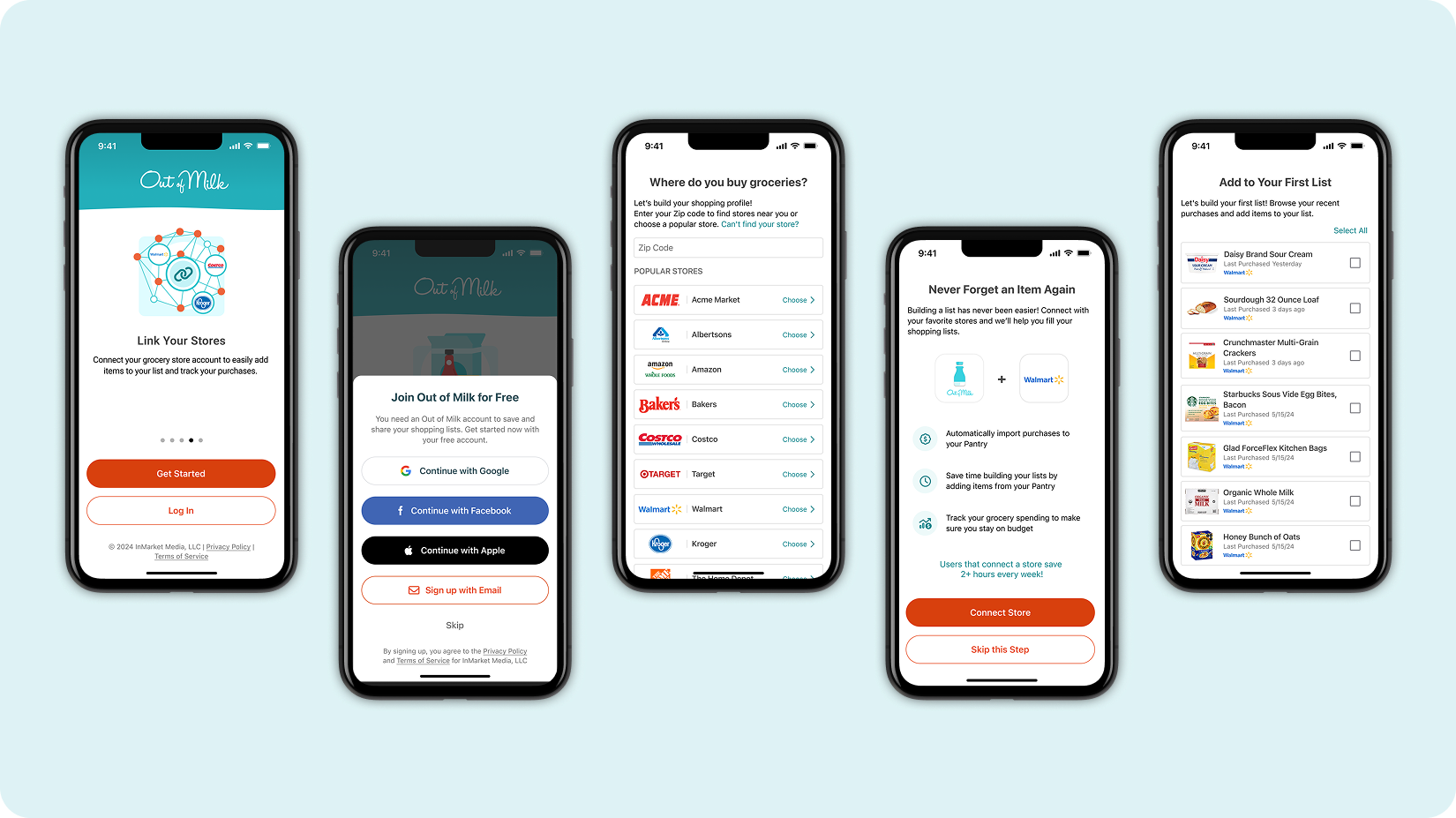
I led a redesign focused on aligning user value with data collection by introducing store-based shopping lists, a new onboarding experience, and purchase history integrations through Cooklist.
THE TEAM
Lead Product Designer (Me)
Product Manager
2 Engineers
1 QA
TASKS
Product Analysis
Surveys
Design System Management
User Testing
A/B Testing
TIMELINE
November 2023- May 2024
The MVP launch established a 19.33% opt-in baseline, revealing key friction points in the onboarding funnel. With a target of 30% adoption, enabling store integrations through Cooklist, laying the foundation for personalized shopping features.
Defining The Problem
Out of Milk historically functioned as a simple shopping list app but needed to evolve into a personalized shopping assistant to remain competitive and provide meaningful value to users.
To achieve this transformation, we needed to understand user shopping behaviors, store preferences, and purchase patterns—data that required user consent and active participation.
PROBLEM MAPPING
Lack of Onboarding
Lack of Data Personalization
Users entered the app without understanding the product's capabilities or how it could help them.
The app did not reflect where users shop or what they typically buy, missing opportunities for value.
Outdated UX Patterns
Unclear Data Requests
The UI had not been updated for many years, hindering the experience and accessibility for users.
The app asked for permissions and account creation without explaining benefits to users
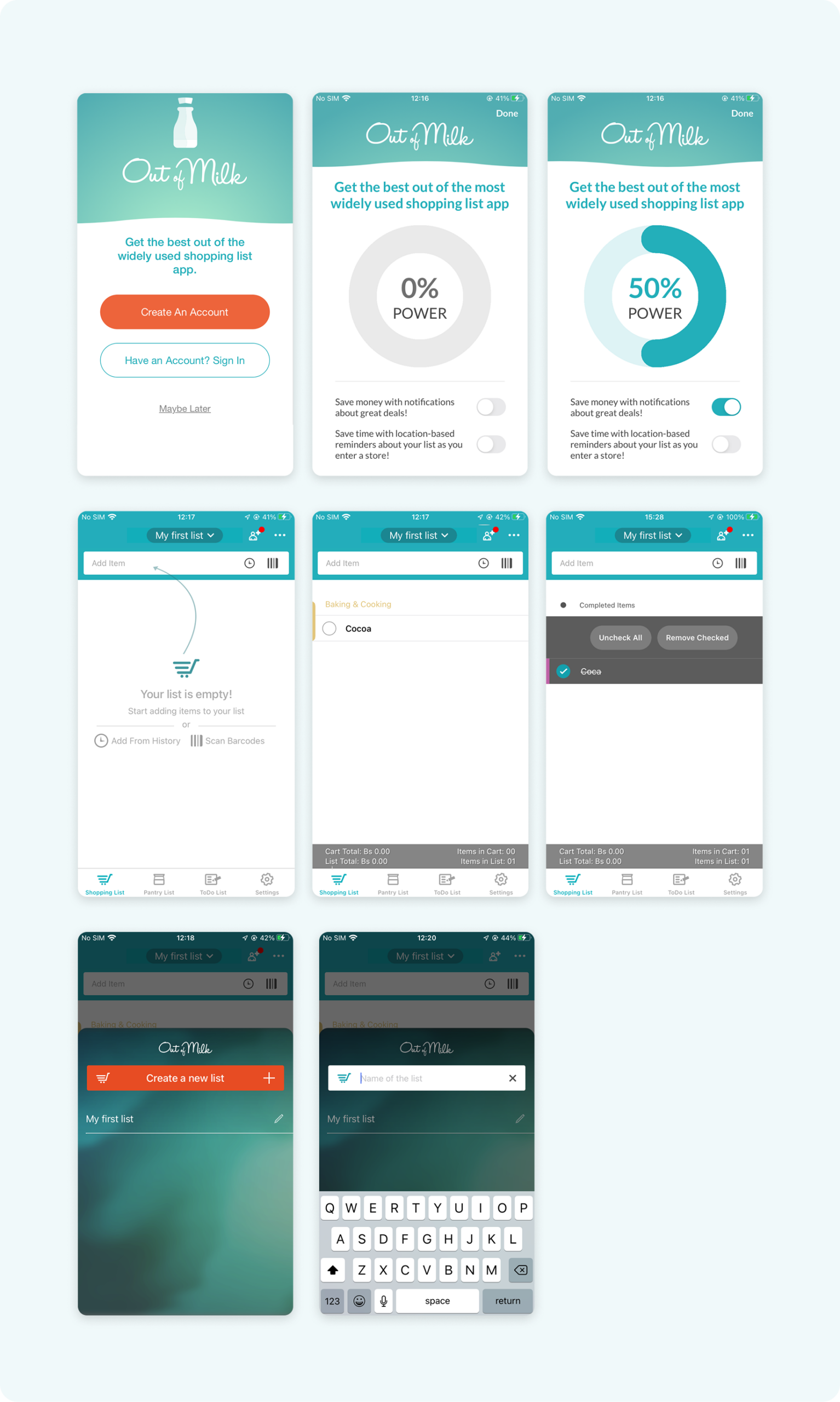
Out of Milk app Experience ( Before )
Research Insights
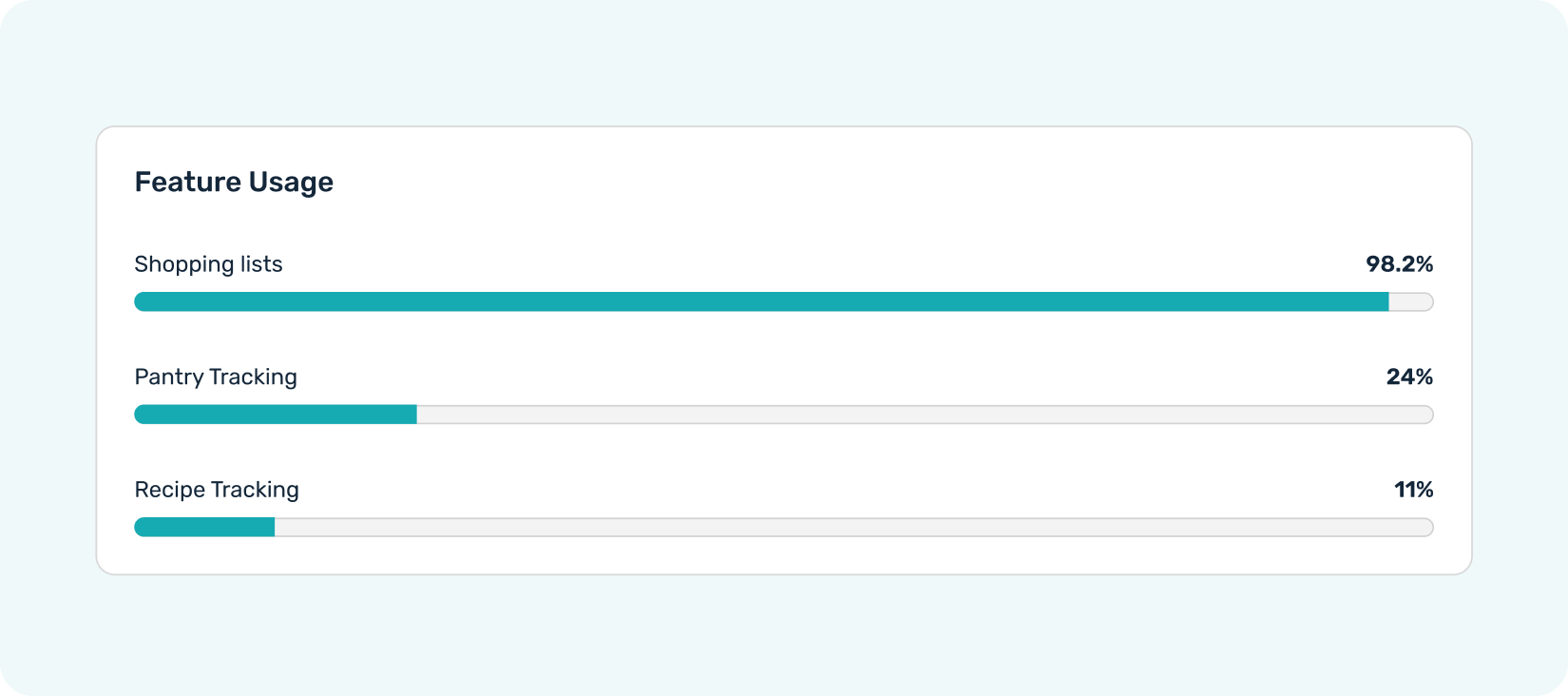
I conducted rapid research by sending surveys to our user base and leveraging existing data. Through this process, we uncovered several key insights that guided our strategy.
MAIN INSIGHTS
Shopping lists are the core experience
Users naturally organize lists by store
Nearly all users rely on shopping lists as their primary feature, making it the foundation for any improvements.
Research showed users create separate lists for different stores, indicating store context matters.
Users expect value for their data 🚩
Users want visible benefits like pricing visibility, coupons, or purchase memory in exchange for sharing information.
First Design Iteration
The initial design concept targeted two key user groups: first-time and returning users. First-time users could create their first store-based list during onboarding—justifying the need for push and location permissions—while returning users would experience this flow later, outside of onboarding.
First-time install — full onboarding experience
App reinstallation — returns without onboarding
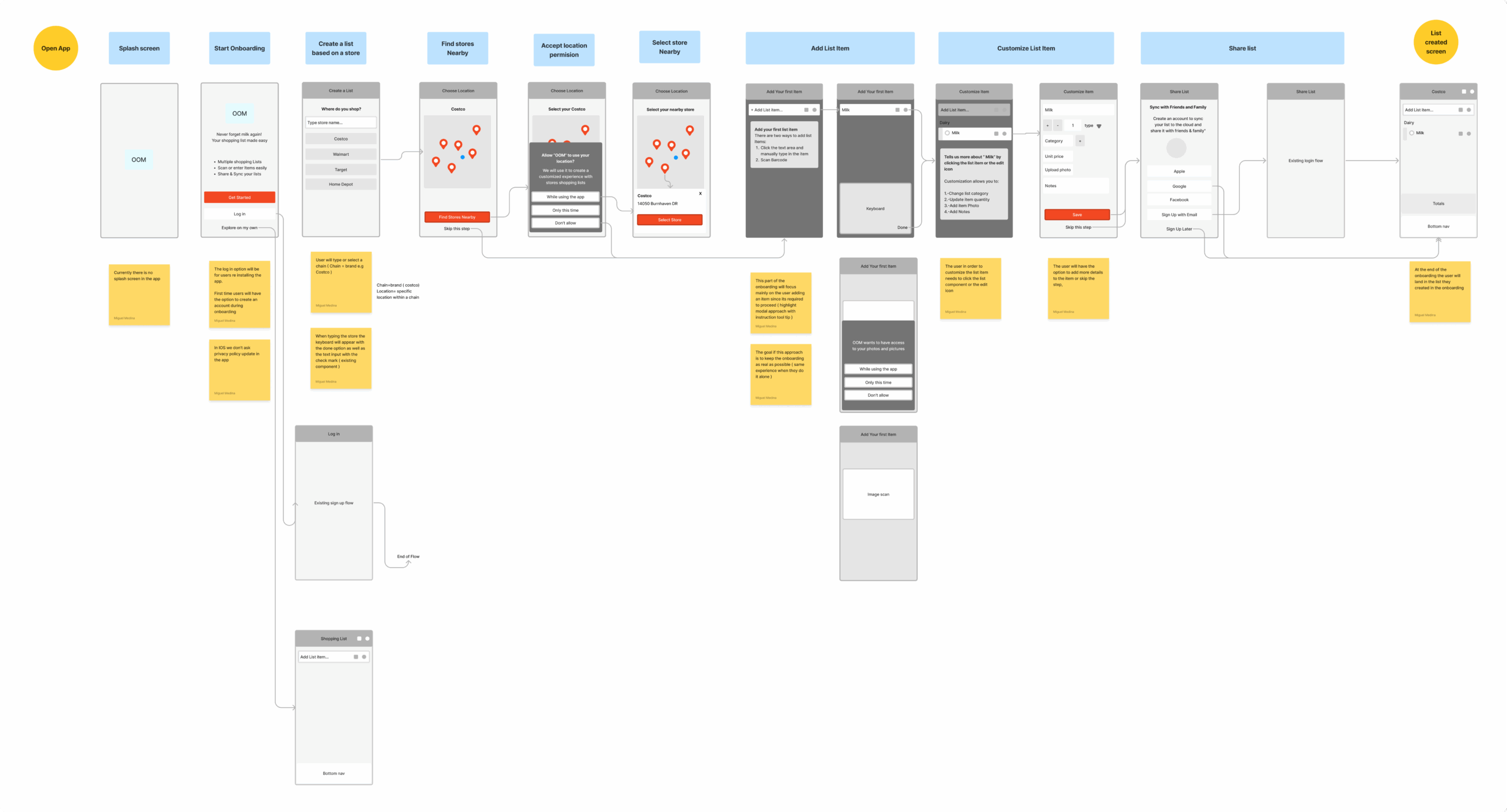
Onboarding and store list user flow exploration
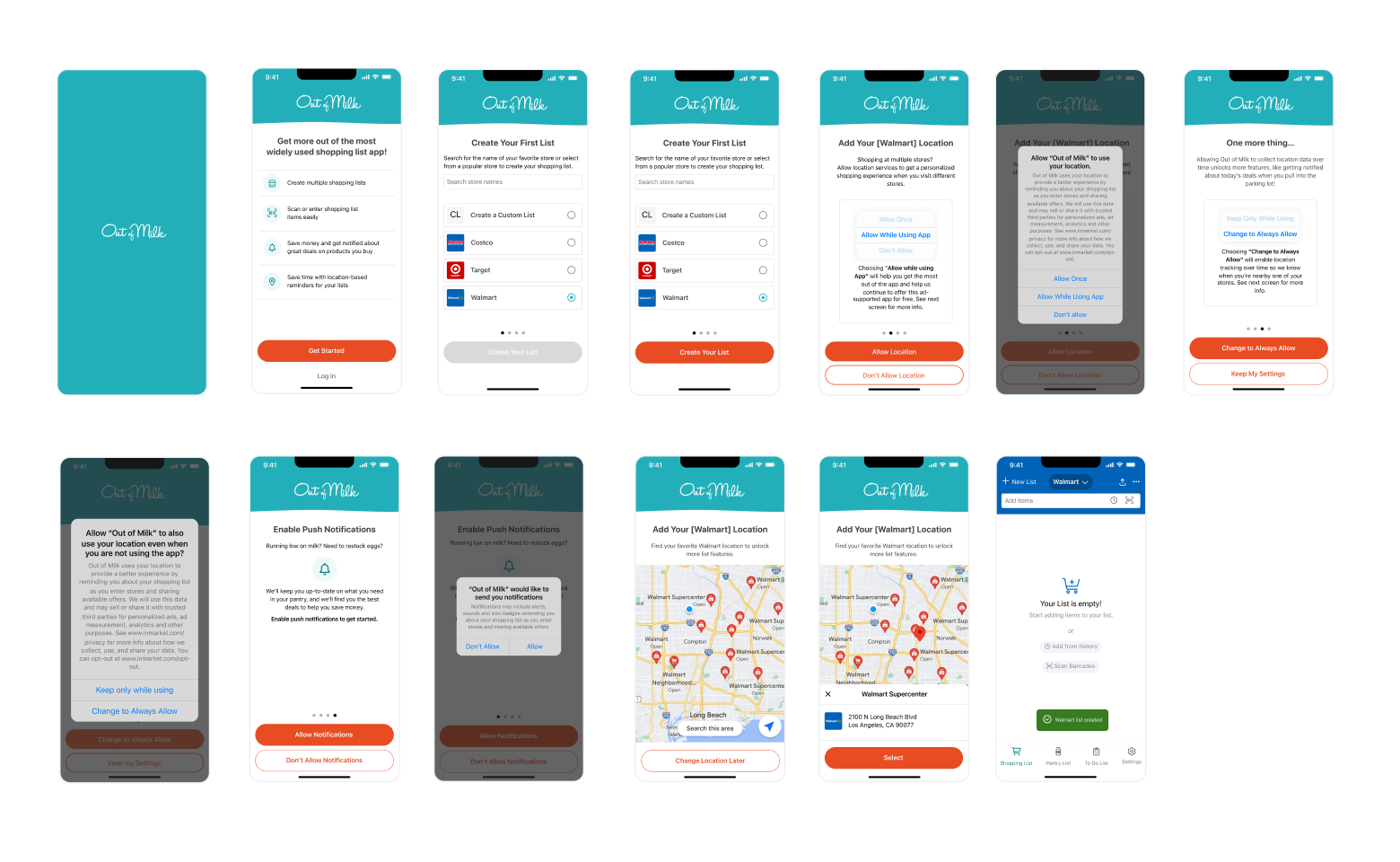
First Onboarding Iteration
Concept Validation
To validate the concept, a second round of surveys was sent to assess the perceived value of the new onboarding and store-based lists. What we learned was clear.
Even with reduced friction and improvements to accessibility and the UI, users still didn’t feel they were receiving meaningful value in exchange for their data. Some of their expectations included:
- Having the prices of items displayed within the app suggests a desire for real-time price information while making lists.
- Ability to cater to specific store items, highlighting the convenience of organizing shopping lists according to different store offerings.
- Notable interest in incorporating coupons or cash back options into the app
Feature Priorization
We evaluated potential features based on user value, business value, and implementation effort to prioritize our roadmap.
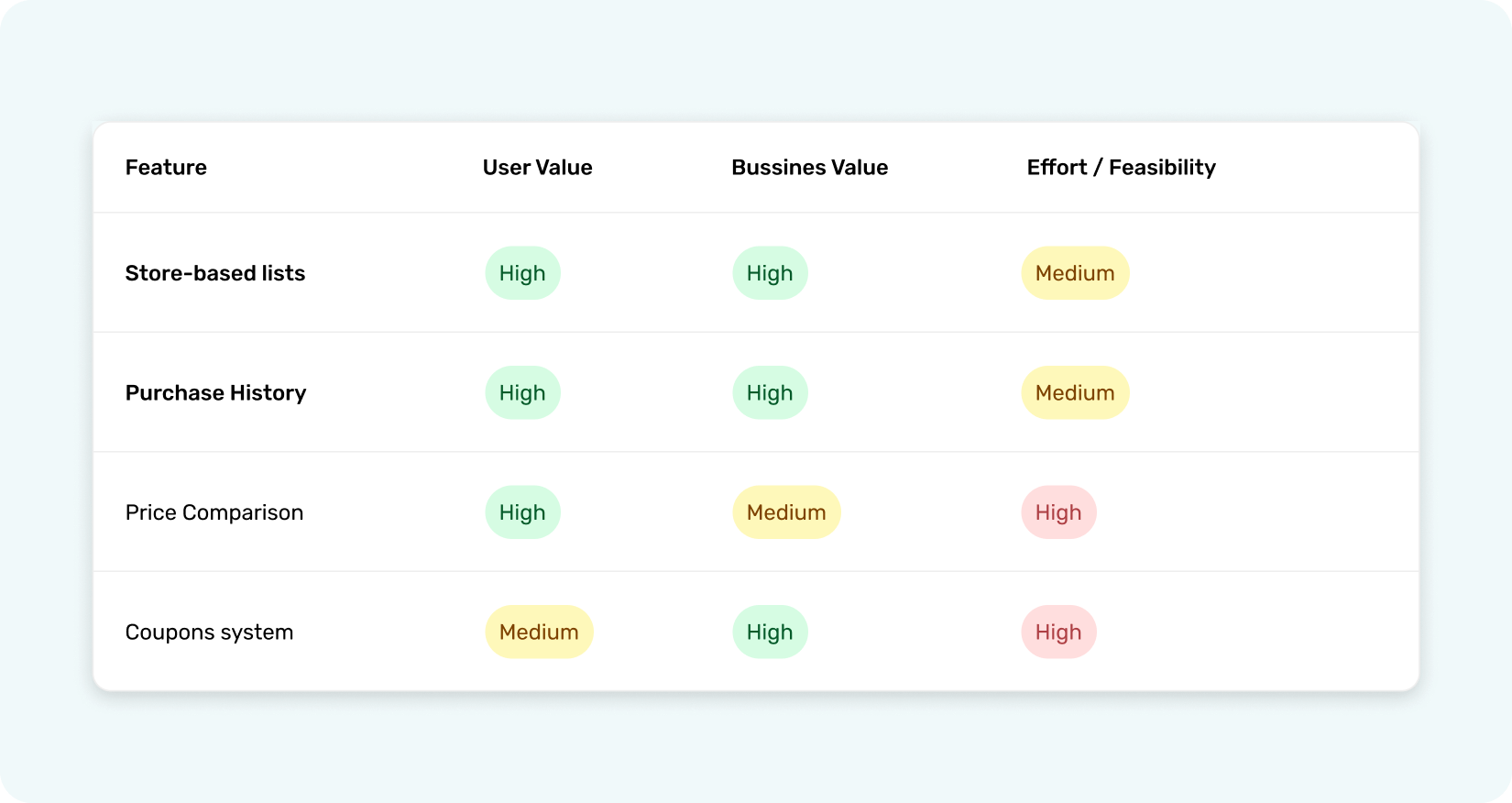
Store-based lists and purchase history integration were prioritized for MVP
We realized that to provide meaningful value and elevate the experience, the app needed support beyond internal features. An external integration aligned perfectly with both user needs and business objectives.
Through Cooklist, users can connect their preferred grocery stores and import purchase data at the item level, creating a richer and more personalized shopping journey.
Building the MVP
The new design iteration focused on the core user flows that had the greatest impact on our solution. This approach aligned with leveraging a third-party integration to enhance the user experience with new features while also opening additional avenues for data collection.
Since users were already creating shopping lists with store names included, building an onboarding experience that aligned with their existing habits proved highly effective.
Hands-on Onboarding experience
During onboarding, first-time users are guided to create their first store-based shopping list by either locating the nearest store or selecting from the most popular choices.
If users can’t find their desired store, they can manually enter by clicking the option "can't find your store?", even if it’s not listed among the provided options.
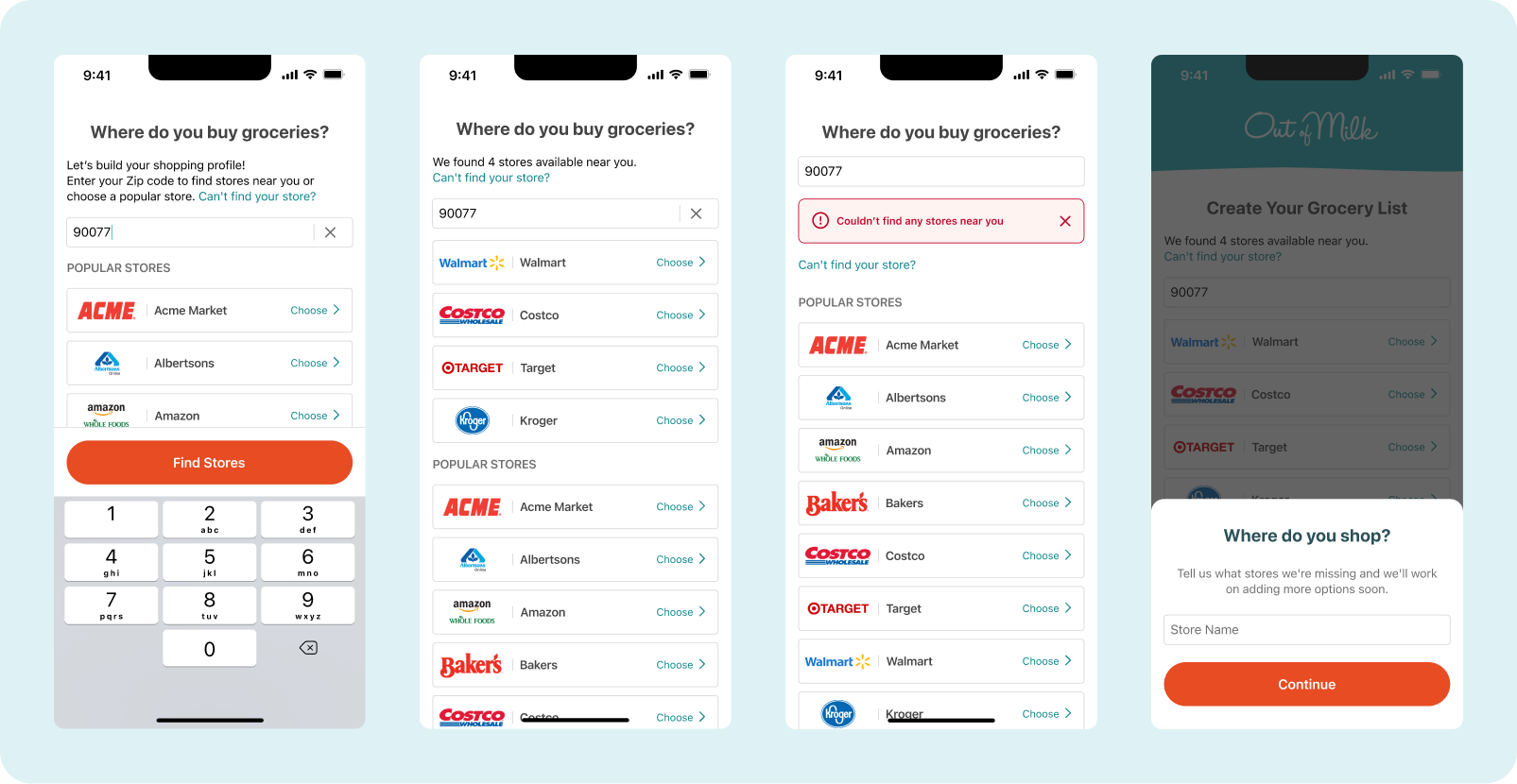
Store selection during onboarding
To enable data import, users can connect their accounts to Cooklist and access their item-level purchase data. After successfully connecting their account, users will be able to add their first items to their store list based on their past purchases.
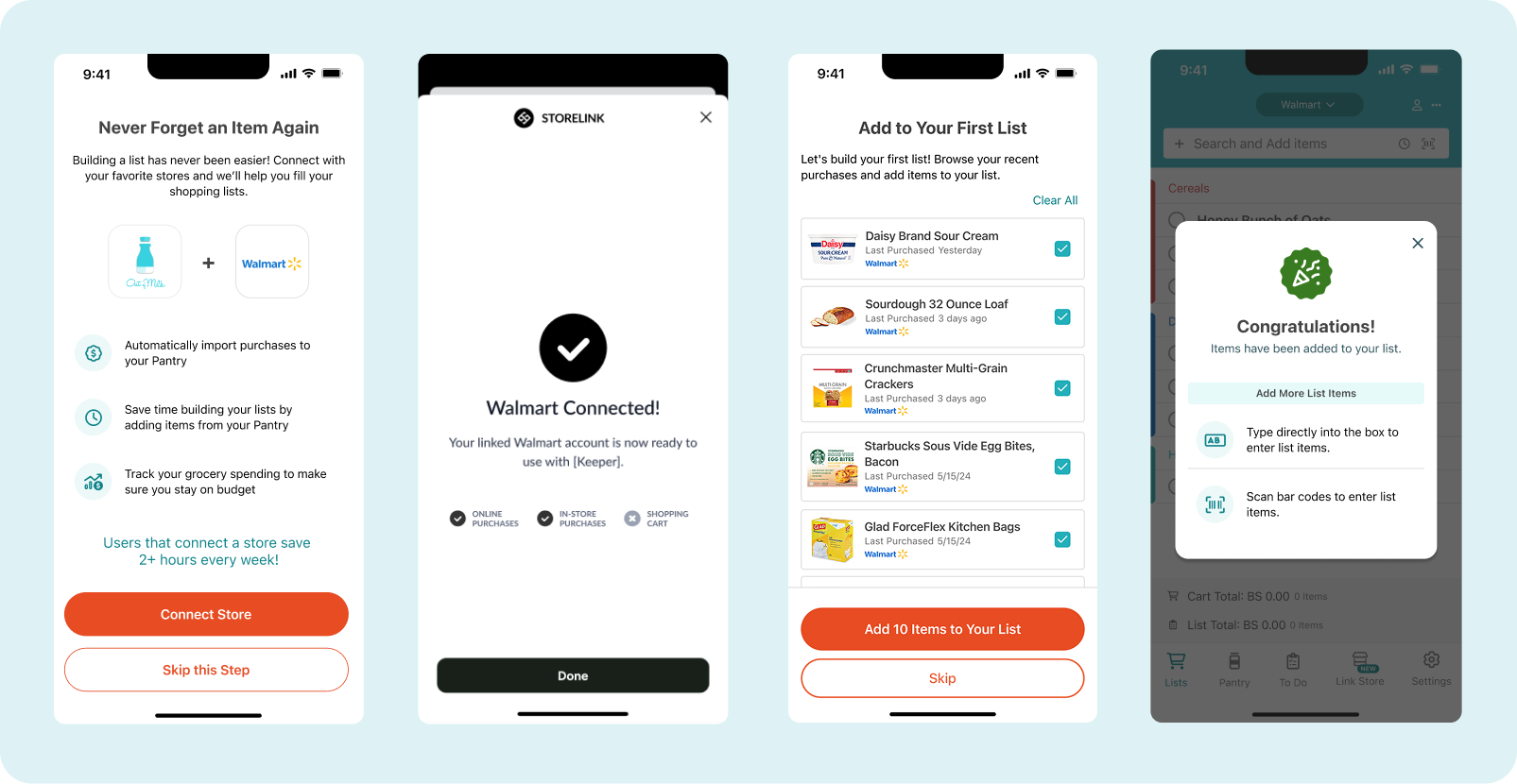
Overview of the store connection process for new users during onboarding
Link Store
The Link Store section serves as the central hub for managing store connections. Existing users can easily link or unlink stores, while first-time users are introduced to the feature through a contextual prompt within their shopping lists. Once connected, users can import past purchase items to create a new store-based shopping list.
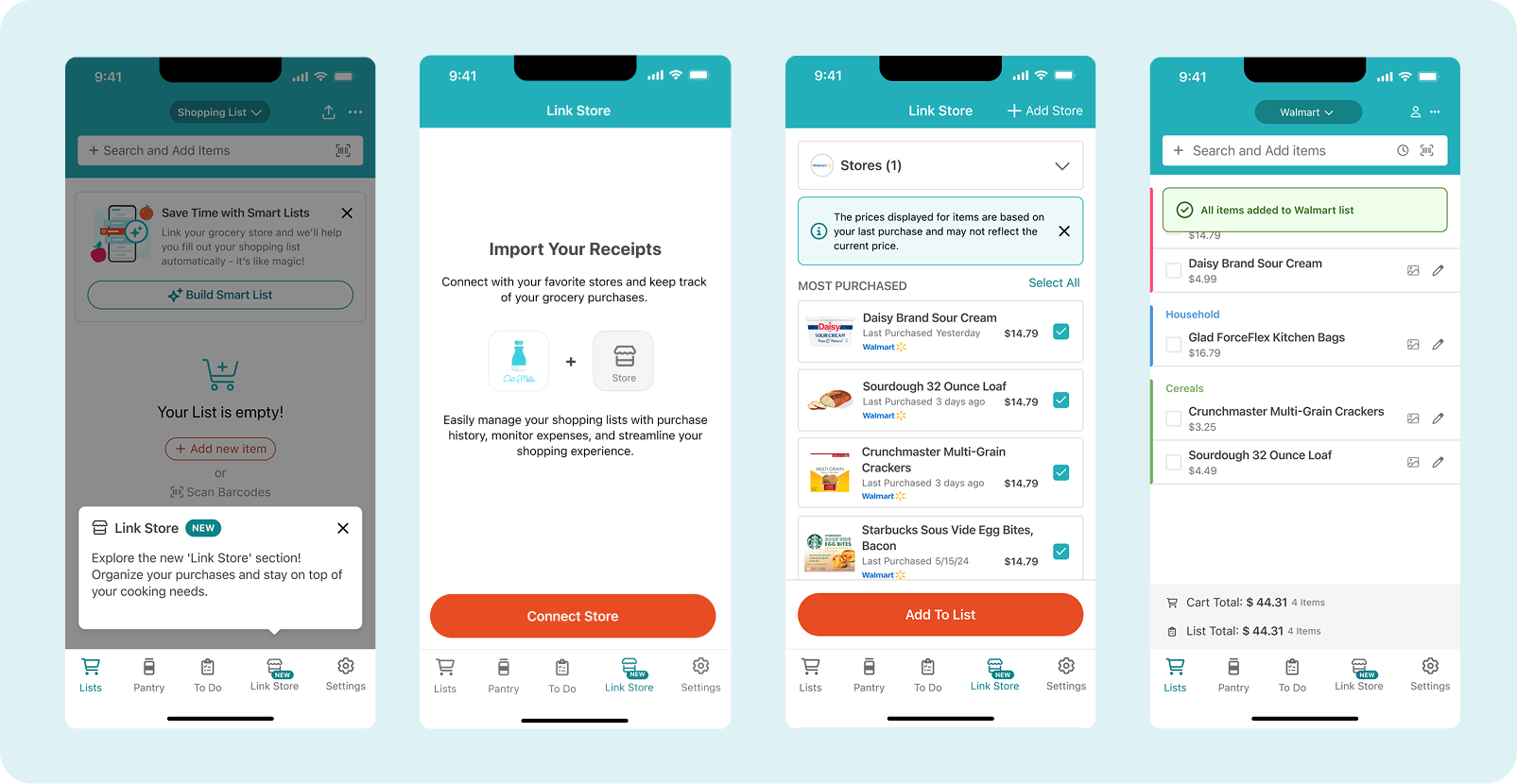
Linking Store Section
Completed Items
Separating completed items from the main list reduced visual clutter, prevented confusion, and eliminated unnecessary scrolling—creating a cleaner, more organized experience. Additionally, keeping pricing and total costs clearly visible allowed users to quickly double-check their spending and verify their final checkout amount.
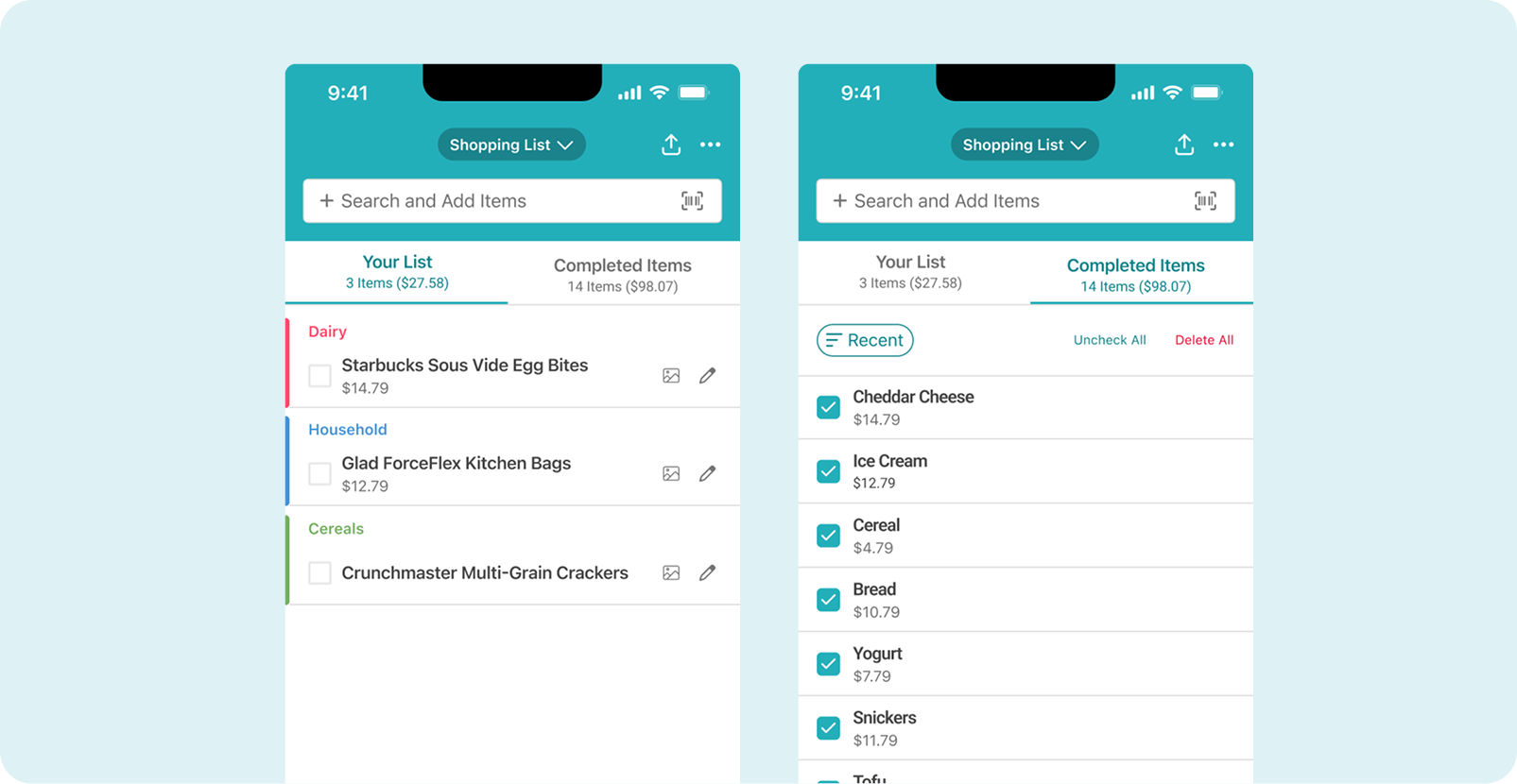
Shopping List Improvement
MVP Launch & Analytics
After launching the onboarding experience, we used Mixpanel to track opt-in metrics and identify friction points across the conversion funnel. With an opt-in rate of 19.33%, we analyzed where drop-offs were occurring.
The data showed that the biggest drop-offs occurred during account creation, the Cooklist SDK flow, the account requirement step, the Welcome Screen, and the store connection flow. These insights helped us pinpoint exactly where users were failing to convert and guided our next round of improvements.
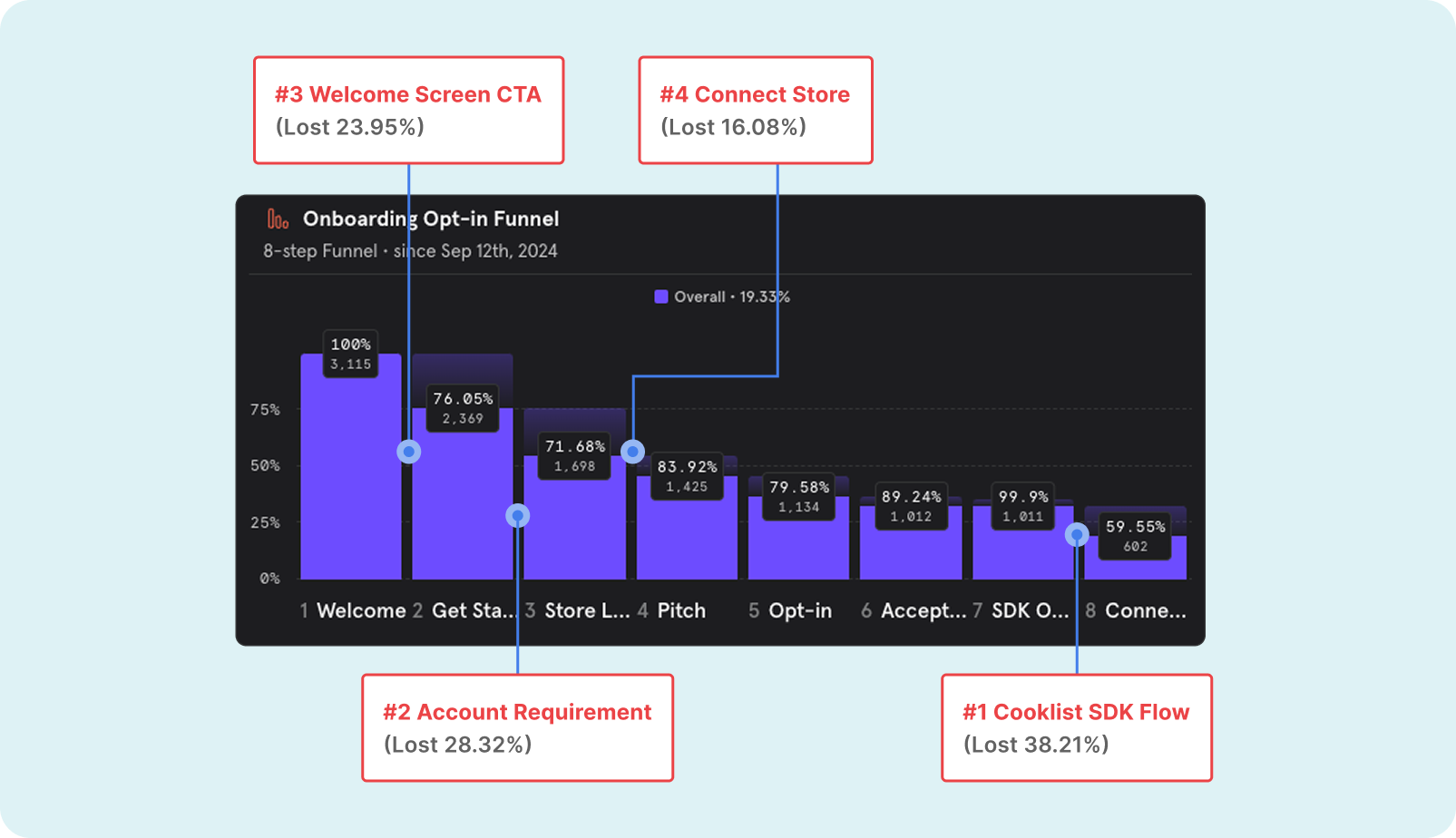
Mixpanel Onboarding Opt-in Funnel
Iteration Strategy
To reach the 30% opt-in target, we identified several optimizations based on analytics insights. Adoption still has room to grow, partly due to limited promotion during the soft launch.
Onboarding Optimization
Remove Account Requirements
Streamline the initial flow by removing unnecessary steps and clarifying value propositions at each stage.
Allow users to experience value before requiring account creation, moving registration later in the flow.
A/B testing store connection
Promote personalized features
Test different approaches to the Cooklist integration to reduce friction and improve completion rates.
Better showcase the benefits of purchase history and smart lists to increase motivation for connection.
Introducing Personalized Suggestions, Smart History, and an improved Add and Search experience is expected to increase engagement among existing users while also helping attract new ones.
Personalized Suggestions
After connecting a store, users can enable personalized suggestions, allowing the app to surface quick-add recommendations on both new and existing lists. This helps them easily spot items that may need restocking, streamlining the entire list-building process.
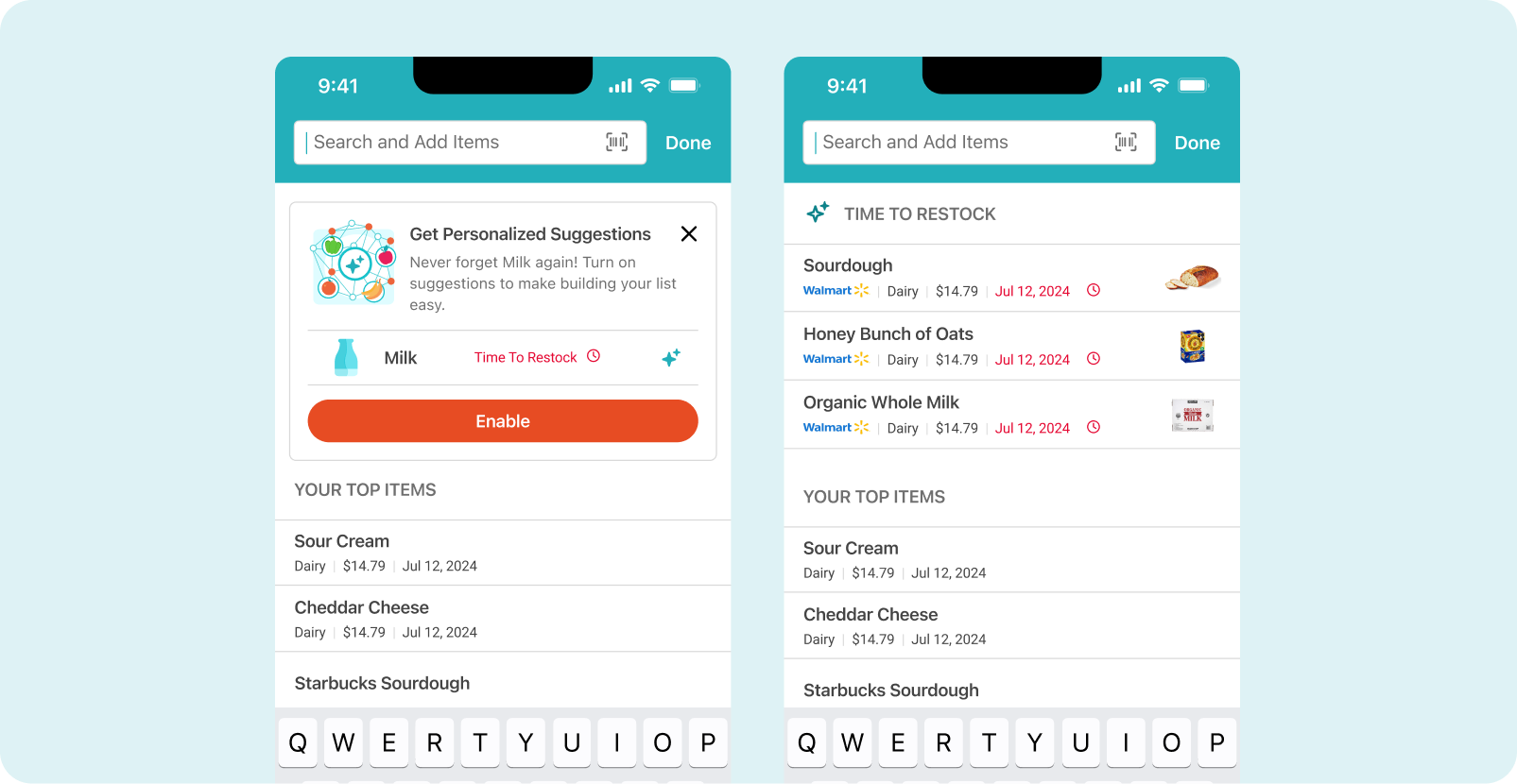
Personalized suggestions when adding items to shopping lists
Smart History
After connecting a store, users can automatically generate lists based on their past shopping receipts, making it much faster to create new lists that reflect their previous purchase habits.
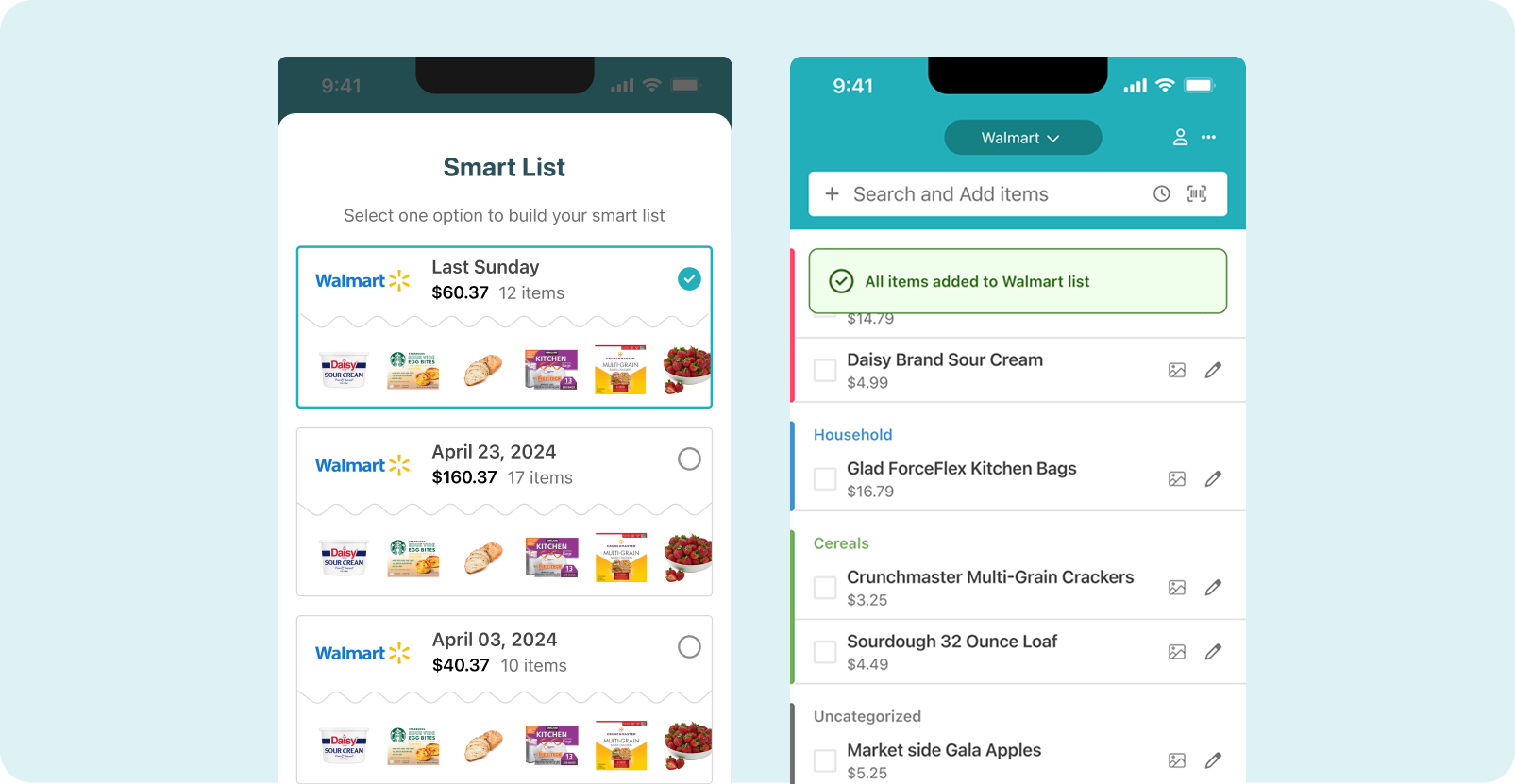
Smart Shopping Lists
New Search and Add Experience
Over time, users begin to see “Top Items” based on their shopping habits and recent additions. This adaptive system makes it easier to quickly find and re-add frequently purchased products.
Users can now multi-select items directly from search results, adding several products to their list in one step without unnecessary back-and-forth navigation.
When an item isn’t already in the system, users can instantly register and save it, ensuring full flexibility for custom or uncommon items.
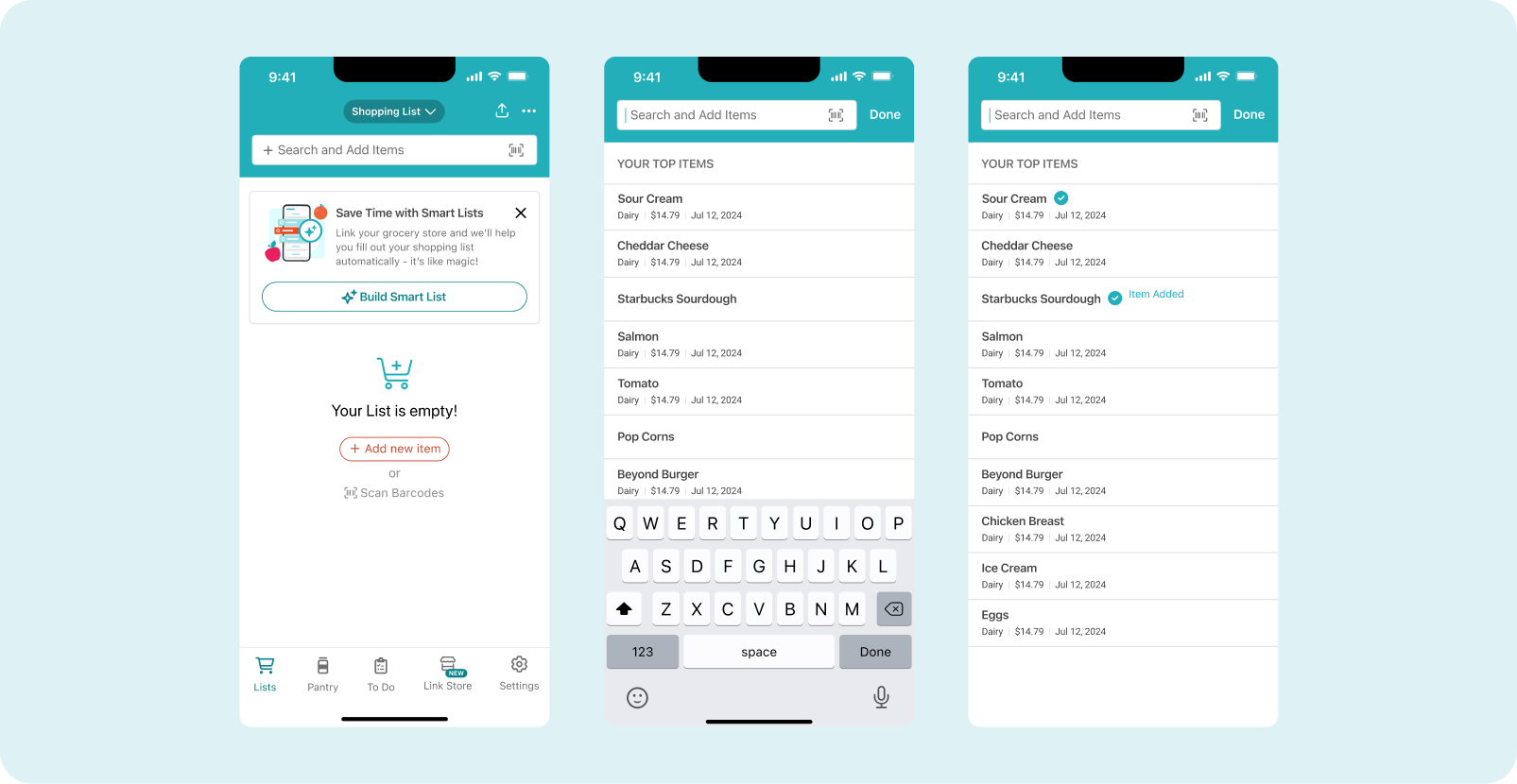
Multiselect from search results
Impact
The MVP launch established a 19.33% opt-in baseline, revealing friction across the onboarding and store connection funnel. With a goal of reaching 30% user adoption, we defined an iteration strategy to optimize onboarding and improve the value exchange for users.
The redesign also enabled store integrations through Cooklist, allowing users to import item-level purchase history. This laid the foundation for personalized shopping features, including Smart History, Personalized Suggestions, and adaptive search experiences.
Takeaways
What Worked
What could be improved
Aligning onboarding with existing shopping behavior proved highly effective. Enabling users to create store-based lists immediately made the experience more intuitive, while the Cooklist integration introduced real purchase data and a stronger value exchange.
The Cooklist connection flow introduced additional complexity, which created friction during onboarding and contributed to funnel drop-offs.
Future Oportunities
Integrating price comparisons, coupons, and grocery promotions, which were frequently requested by users and could significantly increase long-term engagement.
Let's build better products together!
Feel Free to send me a line at mmedina.ldg@gmail.com
Miguel Medina Design All Rights Reserved 2026